BonniePDF: A compliance-ready PDF generation library for .NET and TypeScript

BonniePDF is a zero-dependency layout engine for building complex, auto-paginating PDF documents. Generate tagged PDF/UA and PDF/A output using familiar C# or TypeScript.

  • 295 KBGzipped JS core
  • 6.1 MB.NET DLL
  • 0Dependencies
  • PDF/A + UACompliance
  • v2026.11Latest stable
Author in C# or TypeScript · Preview in the browser · Deploy anywhere
C#.NETTypeScriptJavaScriptNode.jsReactNuGetnpmVisual StudioVS CodeWindowsLinuxmacOSDockerAzureAWSCloudflareGitHub Actions
dotnet add package BonniePDF
npm i @bonniepdf/core
What you can build

From a few lines of code to finished documents

Invoices, payslips, reports, and labels, each shown with the TypeScript and C# source that produced it.

Core capabilities

Build complete PDFs from code

Layout, tables, charts and compliance in C# and TypeScript, with no runtime dependencies.

One model, two languages

using BonniePDF;

BonniePdfLicense.Tier = LicenseTier.Evaluation; // your licence tier, declared once at startup

var doc = new Document();

doc.Metadata = new DocumentMetadata
{
    Title = "Simple Document Example",
    Author = "BonniePDF",
    Subject = "Demonstrating the Document API",
};

doc.Settings = new DocumentSettings
{
    Conformance = PdfAConformance.PdfA2a,
    Accessibility = AccessibilityMode.PdfUa1,
    Language = "en-GB",
    DefaultTextStyle = new TextStyle().WithFamily("Helvetica").WithSize(12).WithColor(ColorPalette.Slate[600]),
};

// ── Page 1 ──
doc.Add(new Heading("Hello, Document API!")
{
    Level = 1,
    FontName = StandardFonts.HelveticaBold,
    FontSize = 24,
    Color = ColorPalette.Slate[800],
    Margin = new Thickness(0, 0, 0, 12),
});

doc.Add(new TextBlock
{
    Text = "This PDF was created using the high-level Document API.",
    Margin = new Thickness(0, 0, 0, 16),
});

doc.Add(new Heading("Key Features")
{
    Level = 2,
    FontName = StandardFonts.HelveticaBold,
    FontSize = 14,
    Color = ColorPalette.Slate[700],
    Margin = new Thickness(0, 0, 0, 6),
});

var features = new UnorderedList
{
    FontSize = 11,
    ItemSpacing = 2,
};
features.AddItem("Simple, intuitive API");
features.AddItem("Built-in metadata support");
features.AddItem("Configurable zoom levels");
features.AddItem("Viewer preferences");
features.AddItem("Automatic page management");
doc.Add(features);

doc.Add(new Line
{
    Thickness = 1,
    Color = ColorPalette.Slate[300],
    Margin = new Thickness(0, 16, 0, 16),
});

doc.Add(new TextBlock
{
    Text = "Existing elements (Heading, TextBlock, UnorderedList, Image, QRCode) tag themselves automatically - no semantic verbs required.",
    Margin = new Thickness(0, 0, 0, 16),
});

doc.Add(new Heading("Scan to verify")
{
    Level = 2,
    FontName = StandardFonts.HelveticaBold,
    FontSize = 14,
    Color = ColorPalette.Slate[700],
    Margin = new Thickness(0, 0, 0, 6),
});

doc.Add(new QRCode
{
    Data = "https://bonniepdf.dev",
    Size = 100,
    AltText = "QR code linking to https://bonniepdf.dev",
});

// ── Page 2 ──
doc.AddPage();

doc.Add(new Heading("Page 2: Summary Table")
{
    TocIdentifier = "page2",
    Level = 1,
    FontName = StandardFonts.HelveticaBold,
    FontSize = 20,
    Color = ColorPalette.Slate[800],
    Margin = new Thickness(0, 0, 0, 12),
});

doc.Add(new TextBlock
{
    Text = "This demonstrates multipage support with automatic page management.",
    Margin = new Thickness(0, 0, 0, 16),
});

var table = new Table(160f, 160f, 175f)
{
    HeaderBackgroundColor = ColorPalette.Slate[800],
    HeaderTextColor = Color.White,
};

table.AddHeader(
    new TextBlock { Text = "Component", FontName = StandardFonts.HelveticaBold, FontSize = 10 },
    new TextBlock { Text = "Runtime", FontName = StandardFonts.HelveticaBold, FontSize = 10 },
    new TextBlock { Text = "Status", FontName = StandardFonts.HelveticaBold, FontSize = 10 }
);

table.AddRow(
    new TextBlock { Text = "Core Engine", FontSize = 10 },
    new TextBlock { Text = ".NET / TypeScript", FontSize = 10 },
    new TextBlock { Text = "Production Ready", FontSize = 10, Color = ColorPalette.Emerald[600] }
);
table.AddRow(
    new TextBlock { Text = "Typography Engine", FontSize = 10 },
    new TextBlock { Text = "Embedded Fonts", FontSize = 10 },
    new TextBlock { Text = "Production Ready", FontSize = 10, Color = ColorPalette.Emerald[600] }
);
table.AddRow(
    new TextBlock { Text = "Vector Graphics", FontSize = 10 },
    new TextBlock { Text = "SVG / QR / Barcode", FontSize = 10 },
    new TextBlock { Text = "Production Ready", FontSize = 10, Color = ColorPalette.Emerald[600] }
);

doc.Add(table);

byte[] bytes = await doc.GenerateBytesAsync();

Layout that flows across pages

Auto Pagination
  • Compose without coordinatesArrange stacks, rows and containers. The engine handles placement.
  • Smart page breaksKeep headings with their text, hold groups together, or start a new page.
  • Headers, footers, and layersRepeat page headers and footers, and add letterheads or watermarks.
  • Page numbers and contentsPage counts and table of contents references resolve automatically.
Running headers, keep-together callout blocks, and automatic pagination

Tables and charts, built in

Tables & Chart Types
  • Tables across pagesSet column widths, merge cells and repeat headers across pages.
  • Rich cell contentPut text, images, charts or barcodes in individually styled cells.
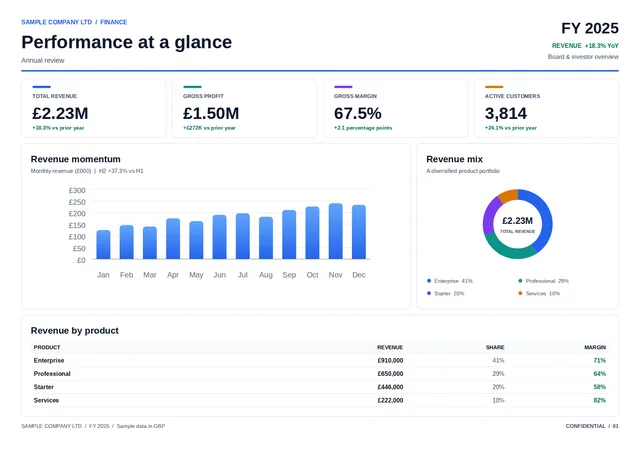
  • Chart typesBar, grouped bar, line, area, pie, donut, dot and lollipop charts.
  • Reuse charts on the webExport the same chart as SVG for your web dashboard.
An annual review with bold KPIs, gradient bars and a revenue-mix doughnut
Built-in vector charts—ready for PDF pages or web dashboards

Compliance built into your document

PDF/A and PDF/UA
  • PDF/A-1 to PDF/A-4Colour profiles, metadata and embedded fonts for archival documents.
  • Accessible PDF/UA-1 and PDF/UA-2Tag text, tables, lists and images in reading order.
  • Catch issues before exportPreflight checks flag missing alt text and low colour contrast.
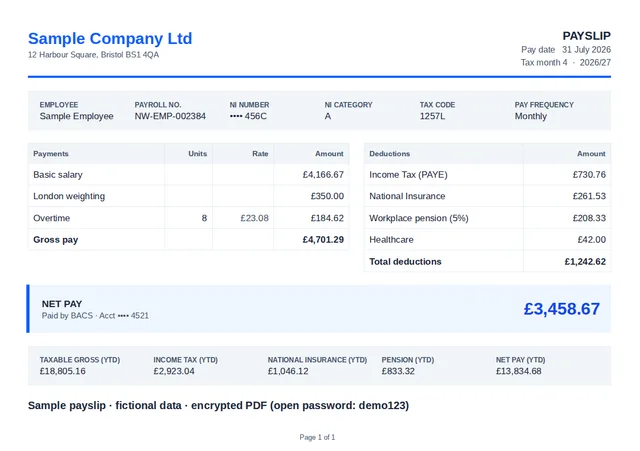
  • Factur-X e-invoicingEmbed EN 16931 invoice XML. PDF output is tested with veraPDF.
PDF/A-3 invoice with embedded Factur-X XML and tagged structure

Barcodes without extra libraries

1D & 2D Vector Codes
  • QR codesVector QR codes with custom colours and configurable error correction.
  • Data MatrixSquare and rectangular codes for small labels and packaging.
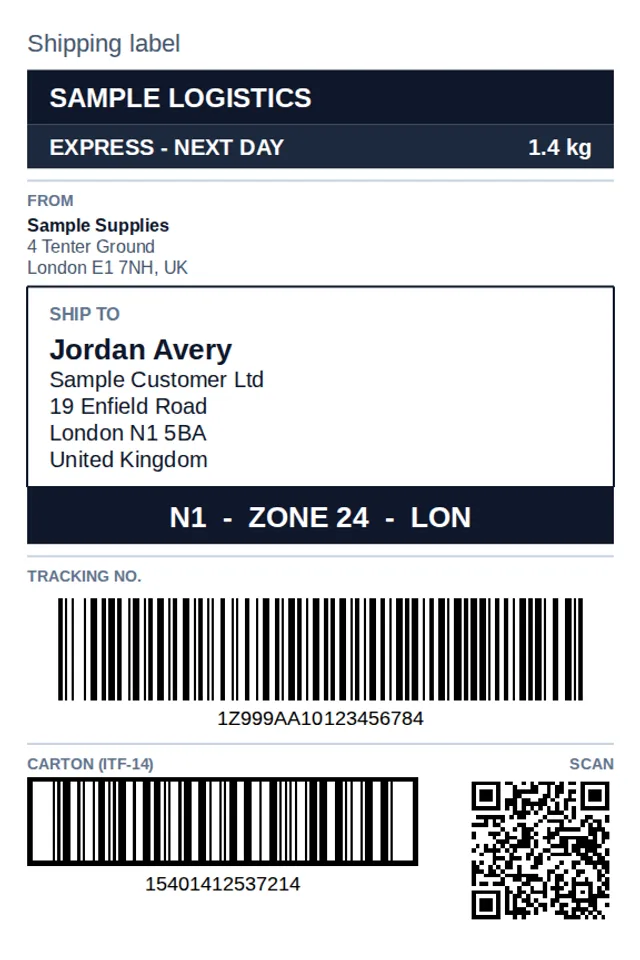
  • 1D retail and shipping codesCode 128, EAN-13, UPC-A and ITF-14, with automatic check digits.
  • No barcode fonts to installDrawn as PDF vectors, with alt text for accessibility.
QR codes across four error correction levels
1D shipping and retail barcodes with automatic check digits

Typography for global documents

OpenType & RTL
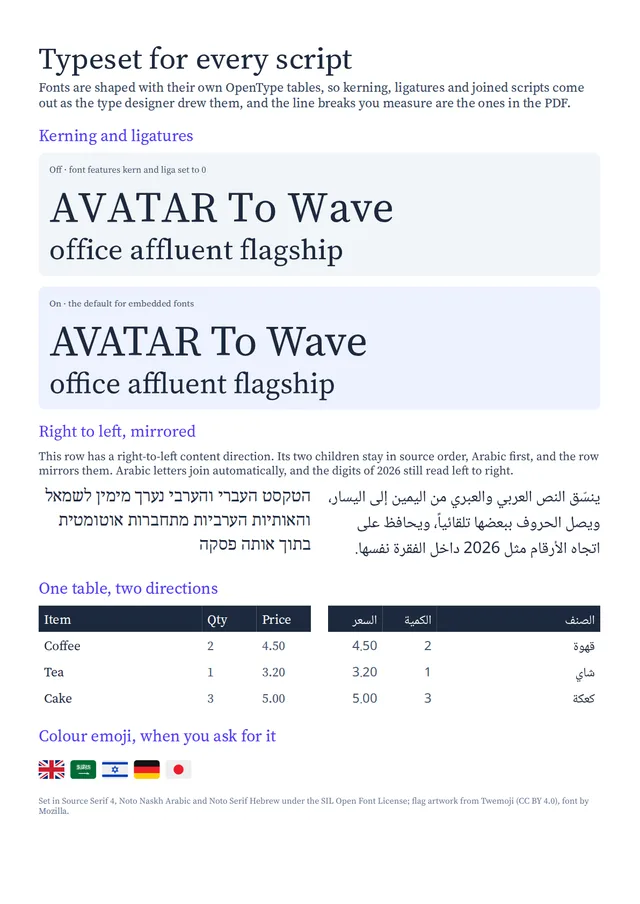
  • Kerning and ligaturesUse your fonts’ spacing and ligature rules for polished text.
  • Arabic and HebrewAutomatic text shaping and mirrored layouts for right-to-left scripts.
  • Small file sizesEmbed only the font characters your document uses.
  • Font fallback and emojiFill missing characters with fallback fonts, and enable colour emoji.
Kerning, mirrored Arabic and Hebrew tables, and vector emoji on one page

Images in, PDF and SVG out

SVG, PNG & JPEG
  • Import SVGs as native vectorsKeep logos, icons, gradients and masks sharp at any size.
  • Embed PNG and JPEG imagesPreserve PNG transparency and JPEG quality, with five image fit modes.
  • Export pages as SVGCreate standalone SVG pages with embedded fonts for browser previews.
  • Accessible and resilientAdd alt text, mark decorative images and handle unsupported SVG features.
Twelve national flags imported from SVG as native PDF paths and gradients
Standards compliance

Archival & accessibility

PDF/A and PDF/UA are document settings with no post-processing step.

Archival
PDF/A • ISO 19005 support

For documents that must stay readable for decades. PDF/A-3 is also the container format for Factur-X and ZUGFeRD e-invoices, and PDF/A-4f carries attached files on PDF 2.0.

Eight levels are supported, from PDF/A-1b to PDF/A-4f, and every font is embedded automatically.

  • PDF/A-1b
  • PDF/A-1a
  • PDF/A-2b
  • PDF/A-2a
  • PDF/A-3b
  • PDF/A-3a
  • PDF/A-4
  • PDF/A-4f

Accessibility
PDF/UA • ISO 14289 support

Headings, paragraphs, lists, tables, and figures are tagged from the element tree, in reading order, so a screen reader can navigate them. PDF/UA-1 writes PDF 1.7; PDF/UA-2 writes PDF 2.0 and pairs with PDF/A-4 or PDF/A-4f.

Whether a finished document is accessible still depends on its content, so it needs a human review.

  • PDF/UA-1
  • PDF/UA-2
Why BonniePDF

Solve the hard parts of PDF generation

Everything below ships in the core package, for both .NET and TypeScript, with no extra services.

Typography and scripts

Kerning, ligatures and OpenType features, Arabic and Hebrew text, and automatic font fallback.

Faithful vector SVG

Logos, icons and flags become native paths and gradients, identical in both languages.

PDF/A, PDF/UA and e-invoicing

PDF/A-1 to PDF/A-4 and tagged PDF/UA-1 and PDF/UA-2 are document settings, with Factur-X and ZUGFeRD attachments.

JSON templates

Serialise any document to JSON, edit it anywhere and render it later, with strict validation.

Automatic pagination

Flow text and tables across pages, with repeating headers and widow and orphan control.

Charts and barcodes

Bar, line, area and donut charts, plus QR, Data Matrix and retail barcodes, drawn as vectors.

Nothing to install or run

No headless Chromium, native binary or WASM module. It runs wherever .NET or JavaScript runs.

Navigation and security

Bookmarks, tables of contents with resolved page numbers, and AES-256 encryption with permissions.

Shared specification

C# and TypeScript implement one specification, so both produce the same document.
Footprint

Small enough to ship anywhere

The same engine runs in the browser, Node, Bun, Deno, edge runtimes and .NET, with nothing extra to install.
Whole TypeScript library
295 KB
Every export, minified and gzipped
.NET assembly
6.1 MB
One managed DLL is the whole package
Native binaries
0
No headless browser, no runtime dependencies

Measured from each build. How we measure • Client-side browser generation

Licensing

Free under $1M in revenue

Above that, one licence per company covers both runtimes and signing.

  1. Community

    Free

    Revenue below $1M/year

    Or eligible community use

  2. Professional

    $1,499

    Renews at $499/year

    One company + signing

  3. Enterprise

    $3,999

    Renews at $1,299/year

    Groups and procurement

30-day money-back guarantee

Receive a full refund if BonniePDF isn’t right for you, with no reason needed.

Compare licences